Unified System Builder and smart status tracking
- Tomas Kubilius
- Jan 6
- 4 min read


We are excited to introduce a major System Builder update that streamlines carbon footprint creation. This release merges Design and Entry modes into a unified workflow, adds intelligent status indicators for processes, implements comprehensive autosave, and optimizes AI features for better performance.
Unified System Builder workflow
Building carbon footprint systems is now faster and more intuitive. Design and Entrymodes have been merged into a single, seamless workflow, eliminating unnecessary navigation. Instead of Design, Entry, and Analyze tabs, the system now includes only Builder and Analyze tabs.
Instead of modal windows, the interface now uses right-side drawers. Simply click on any node to open its corresponding drawer. When the user clicks on the black canvas, the Properties drawer appears. The drawer can be closed using the arrow located in the center.
A zoom-in option is available when clicking on a node, allowing for more detailed editing. For larger systems, a minimap is provided to help users navigate quickly and easily view node details.

What changed?
1. Previously, you switched between two separate tabs:
Design tab: Create structure, name nodes, assign units
Entry tab: Add quantities and carbon emission data
Now, all functionality lives on one page - Builder. Create nodes, connect them, and populate data without switching contexts.
2. Allocation fields have been moved from Output nodes to the Process node and will appear once one or more Outputs are added. When a user adds more than one Output, they must return to the Process node to define the allocation. If only one Output is added, the allocation is automatically set to 100%.

3. Instead of using a link icon between an Intermediate node and a Process node to define the available amount transferred from an Output, this field has now been moved directly into the Intermediate node. This section appears once the user connects an Output to a new Process. If the Output is connected to multiple Processes, all connections will be listed within the Intermediate node, allowing the user to manage allocations in one place.
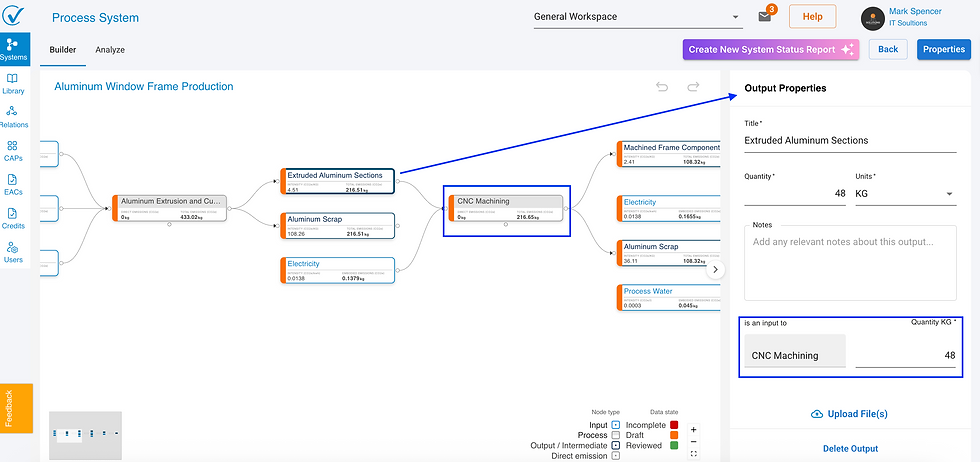
4. Right sidebar replaces modals: Right-side drawers replace modal pop-ups for node editing, allowing users to edit nodes while maintaining full visibility of system context and connections. Automatic sidebar management opens the appropriate sidebar when creating or connecting nodes, applies default names instantly, and auto-saves all data fields.
5. No more manual save buttons: Previous versions required clicking "Save" or "Cancel" buttons after editing nodes. These buttons have been completely removed. All changes persist automatically as you work. Autosave covers all data fields, not just structural elements. Every change you make persists automatically without manual save actions.
6. Save nodes at any stage: Nodes can be saved at any stage, supporting partial data entry with no forced workflow order and allowing users to return and complete data when ready.
7. Visual feedback keeps users informed with a “Saving…” indicator during updates and a brief “Saved” confirmation once the action is complete.
How the unified workflow works
Create and populate nodes in one continuous flow:
Right-click on canvas to add process nodes
Right-click process nodes to add inputs, outputs, or direct emissions
Each new node appears with default name (e.g., "New Input," "New Process"...)
Right sidebar opens automatically for immediate data entry
All changes save automatically as you work
You can save nodes at any completion stage. Return later to finish incomplete nodes without losing progress.
Visual status indicators
Every node now displays a color-coded status that instantly communicates data completeness and review state. This release introduces status indicators for Process nodes along with a Review toggle, making validation and progress tracking clearer and more efficient.
Before:

After

Process node status logic
Process nodes show additional intelligence:
Starts red until connected to at least one input AND one output
Turns orange when all connected nodes have complete data
Requires allocation definition for multi-output processes
Review toggle only enables when entire process is ready
Improved node sidebars with better organization
All node editing happens in right sidebars with enhanced organization and clarity.
Input nodes
Combined fields from previous Design and Entry modes:
Name and unit definition
Quantity entry
Carbon intensity source selection
AI-powered LCI suggestions (on-demand)
Conversion factors for unit mismatches
Notes and document uploads for context
Review toggle when complete

Output nodes
Enhanced allocation management:
Name and unit definition
Automatic connection tracking
Clear display of all connected outputs
Clear visibility of which processes consume this output
Automatic allocation prompt: When connecting an output to additional processes, the output sidebar automatically opens to show the new allocation section, making it clear that allocation percentages need updating.

Direct emission nodes
Streamlined emissions entry:
Emission source definition
Quantity and intensity fields
Conversion factors when needed
Emision factors type selection

Process nodes
Central hub for process management:
Process name
Automatic output allocation section
Allocation percentages required for multiple outputs
Review status tracking

Properties access
System properties remain accessible through the Properties button, opening in the right sidebar with the same consistent interface.

Impact on existing systems
Your existing systems work exactly as before. All data, connections, and analysis results remain unchanged. The new interface simply provides a more efficient way to create and edit systems going forward.
No migration needed:
Existing systems open in the new unified interface
All historical data preserved
Calculations remain identical
No action required from you
Coming soon
We continue to refine the builder experience with upcoming features:
Comment system for team collaboration on nodes
Related articles
These articles have been updated to reflect the new unified System Builder workflow:
Questions? Contact support@carbonsig.com o