Enhanced Table Experience Now Live
- Tomas Kubilius
- Jul 16, 2025
- 2 min read


🎉 What's New
We're thrilled to announce the release of our completely redesigned table experience! Every data table across CarbonSig has been upgraded with powerful new features and improved user experience to help you work more efficiently with your data.
✨ New Capabilities
Smart Column Management
Resize any column by dragging its border
Show or hide columns with our new column manager
Reorder columns with simple drag-and-drop
Pin important columns to stay visible while scrolling
One-click reset to restore default layouts
View all items in the list to have infinitive scroll experience
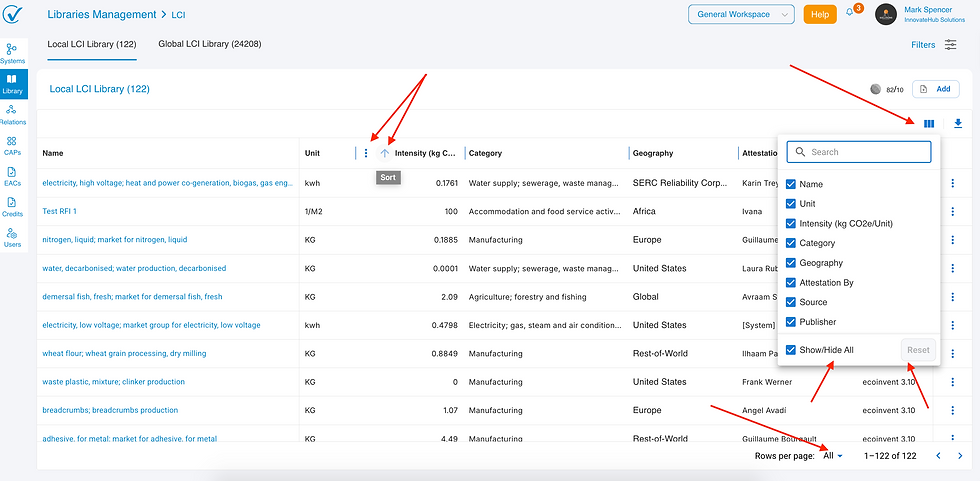
Enhanced Data Sorting
Improved sort controls on all column headers
Clear visual indicators showing sort direction
Consistent behavior across all table types
Streamlined Experience
Standardized layouts for consistent user experience
Page-specific settings that don't interfere with each other
Clean empty states that hide unnecessary elements
Better performance with faster loading times
📊 Affected Areas
This upgrade impacts all data tables throughout the platform:
✅ Process System
✅ Libraries
✅ Relations
✅ CAPs
✅ EACs and
✅ Credits tables
🔥 Why This Matters
For Data Analysts: Customize tables to show exactly what you need, when you need it For Project Managers: Pin key metrics while reviewing comprehensive datasetsFor All Users: Enjoy faster, more intuitive interactions with your carbon data
🚀 Get Started
No action required! The new features are automatically available. Look for:
The column management icon in table toolbars
Resizable column borders when you hover over them
Enhanced sort arrows in column headers
List off of items
💡 Pro Tips
Pin your most important columns for easy reference during analysis
Hide unused columns to focus on relevant data
Resize columns to prevent text truncation
Use the reset button if you want to start over with default settings
🛠️ Technical Notes
Fully compatible with all supported browsers
No change to existing data or permissions
Column preferences are automatically saved per page
Maintains all existing functionality while adding new capabilities
📞 Need Support?
Our team is standing by to help you make the most of these new features:
Support channel: send us email via support@carbonsig.com
Documentation: Updated guides available in the help section
Feedback: Use the feedback button in the app to share your experience
🔮 What's Next?
This release is the foundation for even more powerful features coming soon:
Advanced filtering and search capabilities
Export functionality with custom column selection
Saved table layouts and templates
Bulk data operations
This update represents our commitment to providing you with powerful, intuitive tools for managing your carbon data efficiently.Ready to explore? Log in now and experience the enhanced table functionality across all your carbon data!